Before you start: compatibility
✅ Android — phone or tablet, using the Chrome browser. This is the target platform, and the tested one.
⛔ iPhone and iPad: this does not work, and will not. Safari does not implement the Web Bluetooth technology the app relies on. That is not an EVSpark limitation, it is an Apple decision.
💻 On a Windows PC the app works with Chrome or Edge — on a very old Bluetooth adapter the connection can fail, and a recent USB dongle is then enough to fix it. But if you diagnose from a computer, EVSpark Windows remains the right tool: it is the more complete version.
Windows or Web: which one is for you?
Both do the same job. The choice depends on what you have to hand, not on features.
💡 Both versions produce exactly the same recording format. A capture made on the phone can be read back in the Windows version, and vice versa. They are two doors into the same project, not two competing programs.
What hardware you need
The box goes together in minutes, with no soldering: one board plugs into the other. No cable to make — the OBD2 connector is already on the board.
- MrDIY ESP32 CAN Shield v1.3 — the board carrying the OBD2 connector, the power supply and the CAN interface. Available from store.mrdiy.ca.
- An ESP32 DevKit V1 board, 30 pins — the brain, which brings the Bluetooth. It does not come with the shield and is available everywhere.
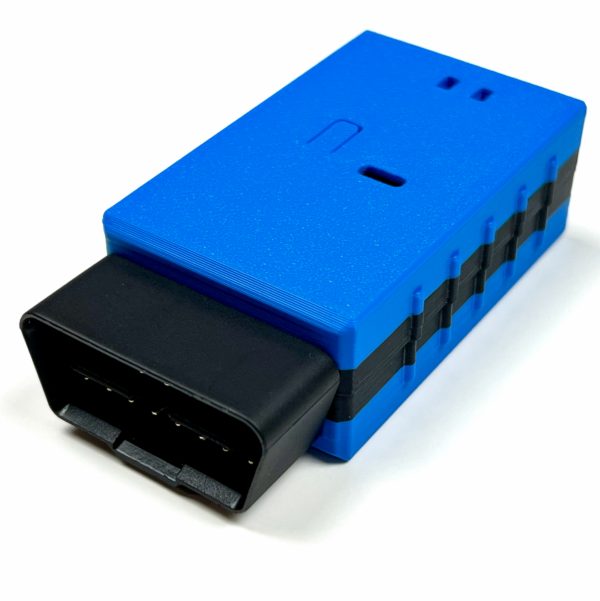
The simplest route: the pre-assembled version
MrDIY sells the unit assembled by hand, ready to plug in. It contains everything: the ESP32 DevKit v1 board, the CAN shield in its latest version, the OBD2 plug and a 3D-printed enclosure. Nothing to fit together, nothing to order elsewhere. The enclosure clips open without tools, which you need to do once: to set the switch, and to reach the BOOT button when installing the firmware.
€86 — against €35 for the bare shield, to which you must then add an ESP32 board and, if you want one, an enclosure.
View on store.mrdiy.ca📦 The shield ships from Canada: allow for the delay and the associated costs. That is the main drawback of this solution, and it is better known before ordering. We chose it because it already integrates the OBD2 connector and the voltage converter, which avoids any delicate wiring and yields a box you can leave permanently plugged in, like a commercial dongle.
🔧 One setting only, but do not miss it: the switch on position R — listen only, the device never transmits anything on the car's bus. As for the 120 Ω termination, there is nothing to do: it is disabled from the factory, and enabling it would mean soldering a jumper on the board. That is exactly the state you want — the Mia bus already has its terminating resistors.
Install the firmware, from this site
The box needs to be programmed once only. Nothing to install: the browser handles it, just as it will later handle reading the car's data.
💻 Do this from a computer, using Chrome or Edge, with the ESP32 connected over USB, and preferably with no other tabs open. It is the only step requiring a computer — everything else happens on the phone. Firefox and Safari cannot drive a serial port from a web page.
🔘 Hold the BOOT button on the ESP32 board while you start the installation, and release it once the connection is established. Without this the board will refuse to be programmed — that is normal behaviour for this model, not a fault. On the pre-assembled version this button cannot be reached with the enclosure closed: unclip it to take the board out, which is done by hand, without tools.
✅ Once the installation finishes, unplug the USB cable: the box is ready. It never needs reprogramming again, except for a new version.
🧯 If the browser freezes during installation — it happens — force-quit it without worry: the board is in no danger. Its boot loader is burned into the chip and always responds, whatever state the memory is in. Unplug and replug the USB cable, close your other tabs, and start again.
Getting started
What the app shows you
Where the project stands
🧪 EVSpark Web is new and lightly tested. To date the complete chain has only been validated on a single vehicle. The decoding itself rests on captures from several Mias shared by the community, but the app needs to meet other cars and other phones.
If you try it, your feedback is valuable — especially reports of failure. A message describing what the screen showed when the problem occurred is worth more than ten confirmations that everything works.
Open the app
The app is already online. With no box plugged in it will show nothing, but you can browse it, consult the fault-code directory and install it on your home screen.
🔒 The box listens without ever speaking: it is configured read-only and the hardware switch locks it in that mode. It cannot command anything, nor disturb the car's operation.